
Ordering Reports

Reports are available for purchase between the following times:

Report Availability Price (incl. GST)
  Mon - Sat Sunday  
       
Car History + PPSR Certificate 3am - 12am 3am - 12am $32.95
PPSR Certificate 3am - 12am 3am -12am $22.00
Ordering a report and payment

Q: What do I need to order a vehicle report?

A: All you need to provide to get a Car History Report is the correct VIN (Vehicle Identification Number) of the vehicle as well as a valid credit card for payment.

The Car History system uses a vehicles VIN (Vehicle Identification Number) as the unique identifier. The VIN is required when ordering reports. It is recommended that as many fields are entered as possible to improve accuracy, however they are not mandatory.

Q: What is a VIN?

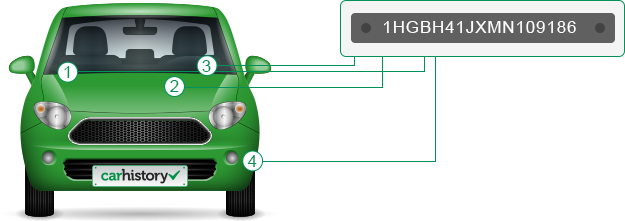
A: The VIN or Vehicle Identification Number is a unique alphanumeric combination of 17 characters assigned to a vehicle. It does not contain the letters I, O or Q

Q: Where can I find the VIN?

A: The Vehicle Identification Number (VIN) can be found on the vehicle itself, either on the dashboard, or on one of the door posts (where the door latches when it is closed). The vehicle’s VIN is also displayed on the registration certificate and insurance policy documentation.

Q: What if the VIN isn't 17 characters long?

A: If the VIN is not 17 characters long, please double-check to make sure that you have the right VIN and have copied it down correctly. If the VIN is still less than 17 characters long, the VIN is most likely from a pre-1989 vehicle.

Q: Pre-1989 vehicles?

A: Prior to 1989, VINs varied in length from 11 to 17 characters. Car History can only report on vehicles that use a 17 character VIN. Therefore, information on vehicles manufactured before 1989 is limited.

Q: How do I order vehicle reports?

A: The easiest way to begin ordering reports is to enter the vehicle VIN (Vehicle Identification Number) on the home page, the follow the 3 step process to obtain your report. You will need your credit card details to finalise the purchase of your report.

Q: How long does it take to get a report?

A: When you order a vehicle report, Car History’s systems immediately access several national databases to compile the report. This usually takes less than 30 seconds however it can take up to 2 minutes. If you find it is taking too long to generate your report, your report will be emailed to the address you provided as soon as it is ready. Your report also remains viewable online through the Returning Customers section of the website for a period of 30 days after purchase.

Q: How can I pay for my report?

A: You can pay for your report via a secure credit card facility on the website order screen. If you require you can email our customer support staff to manually purchase a report at support@carhistory.com.au.

Q: How long is my report valid for?

A: The information presented in the report represents that which is current from Car History's various database sources at the time that the report is requested. In particular, it is important to note that encumbrance status on a vehicle is only valid on the day of purchase and therefore if you plan to purchase a vehicle and in order to protect yourself from potential creditors on the vehicle, we recommend that you purchase a PPSR Certificate on the day you take ownership of the vehicle.

Q: The vehicle details don't match the vehicle I'm interested in getting a report for, what should I do?

A: This could be due to an incorrectly entered VIN or alternatively, that the VIN has been used to rebirth a vehicle. Please send details of such data anomalies to us for investigation at support@carhistory.com.au.

Q: Why is my report taking so long to generate?

A: Car History’s IT systems draw on a large number of data sources in order to compile the reports. In some cases, this process can take a few minutes to complete. If you find your requested report is taking too long for you, we will in any case email your report to the address you provided as soon as it is available. Your report also remains viewable online through the Returning Customers section of the website for a period of 30 days after purchase.

Q: There was an error in processing my report and I was refunded my payment, what can I do now?

A: The error in processing may have been due to a connection malfunction between our system and one of Car History’s third party source databases. We suggest that you resubmit your request. If the error persists, please advise Car History at support@carhistory.com.au .

Q: I was returned a partial report, how do I get the full report?

A: Where for any reason, Car History is unable to access all available information for inclusion in your requested report, we will return a partial report which contains all the information available except for the data that is unavailable at time of compilation. We will then complete the report when the data source becomes available and email it to you. You can also view the report online via the Returning Customers section of the website.

Q: Do I receive a tax invoice when I order?

A: Yes. A tax invoice is sent with your report to the email address you provide us when placing your order.

Q: Why is there information missing from my report?

A: The physical vehicle details, including make, model, engine number, colour, fuel type, registration status, odometer reading and registration expiry date will only be returned and displayed on the Certificate if they have been recorded and are available. In addition, Car History’s database is comprised of many different data sources which combine to present a comprehensive vehicle history. However, we are reliant on the availability of this data from third party supplier data sources and there will be occasions where vehicle data is not available from those sources.

Q: Can I order a Car History Report for a different type of vehicle such as a motorbike or a truck?

A: Yes. The Car History Report is available for other types of vehicles, however some data elements may be missing from the report. Please note that you can run a PPSR Certificate for other types of vehicles.

Q: Can I search Australia Wide for all types of vehicle information?

A: Car History searches are available for all vehicles registered in Australia.